Rubric Generator for Chrome
Describe an assignment in a sentence or two, choose the grade and the kind of rubric, and get a full grading table: criteria down the side, performance levels across the top and a clear description in every cell. Every cell stays editable, and the rubric is yours to copy, save or print.
Add to ChromeComing soon to the Chrome Web Store.
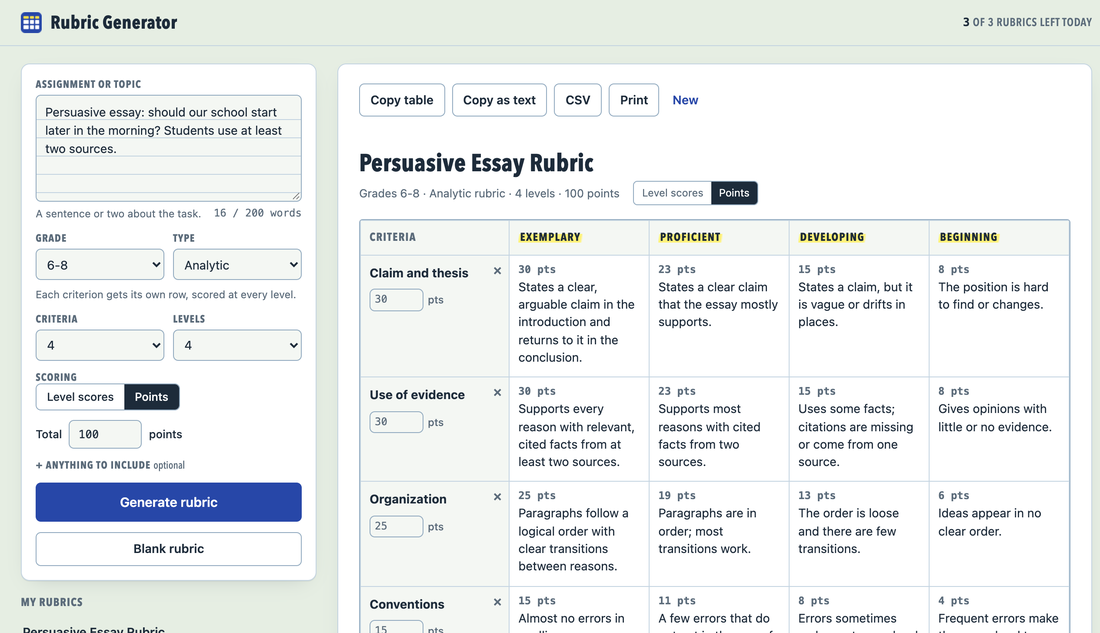
The picture shows a sample rubric.
How it works
- Describe the taskClick the extension icon. It opens in its own tab, where you type the assignment and pick the grade band.
- Choose the shapePick the rubric type, how many criteria and levels you want, and whether rows score 4-3-2-1 or share a points total.
- Edit and copyPress Generate rubric, change any cell, then copy the table into a document or save it as CSV.
A rubric generator that leaves you in charge
An analytic rubric gives each criterion its own row. A holistic rubric describes the work as a whole at each level. A single point rubric shows only what meeting the standard looks like, with space on both sides for your notes. The descriptions name things you can see in student work, such as cited facts or clear transitions, and the wording follows the grade band.
Copy table puts the rubric on the clipboard as a real table. Copy as text gives a compact plain-text version of up to 2,500 characters. Print lays it out on a landscape page with nothing else on it. Every rubric you make is saved in your browser under My rubrics, and a blank grid is always one click away.
What it does not do
It does not grade student work and does not ask for an account. Three AI rubrics a day are included at no cost, and blank rubrics have no limit. Nothing leaves your browser until you press Generate rubric; then only the assignment details go to our server, which discards them once the draft is back.
Questions
Do I need an account?
No. Install the extension, click its icon and describe the assignment. There is nothing to sign up for.
Can I change what the AI wrote?
Yes. Every cell, criterion name and level name is editable, and you can add or remove rows and levels. Your changes are saved in your browser as you type.
Does it grade student work?
No. It builds the rubric; the grading stays with you. Please describe the assignment, not the students, and leave names out.
How the extension and these pages handle data: privacy policy.